

In Asset Management, details of organization’s asset such as domain name, URL, social media handles is captured.
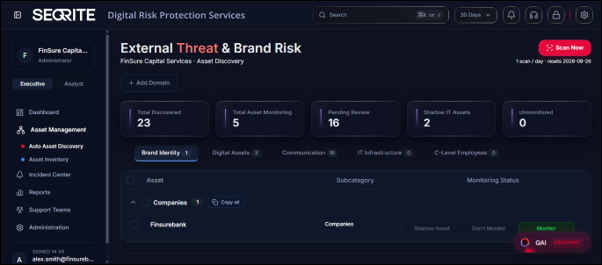
Collecting detailed asset information ensures comprehensive monitoring for security and compliance. This process verifies that your organization legitimately owns or manages each asset, enabling proactive protection and risk mitigation.
The Asset Management includes the following two sections:
Auto Asset Discovery(EASM Capability)
Automatically discovers your organization’s internet-facing assets, including previously unknown or unmanaged assets (Shadow IT). Review each discovered asset and choose to Monitor, Don’t Monitor, or classify it as a Shadow Asset.
Adding Domain
You can add domain domains to enable Asset Discovery and identify internet-facing assets associated with your organization.
To add a domain, follow these steps:
- Go to Asset Management and click Add Domain.
- Enter domain name and click Add.
Asset Inventory
Provides a centralized view of all monitored assets. Use the Asset Inventory to view asset status, manage existing assets, and add new assets as required.
Adding Asset
To add assets, follow these steps:
- Go to Asset Management and click Inventory .
- Click Add Asset .
- Select category, subcategory.
- Enter the details based on selected category and subcategory.
- Click Add Asset.
Category and Subcategory Details
The following table lists the available asset categories and subcategories that can be selected while adding an asset and need to be collected from the organization to start monitoring.
| Category | Subcategory | Description |
| Digital Asset |
|
Covers official websites, domains, subdomains, mobile apps, and digital media assets. |
| Brand Identity |
|
Includes company name, logos, trademarks, slogans, and marketing materials to protect brand reputation. |
| Communication |
|
Corporate emails, customer service numbers, SMS sender IDs, and social media accounts monitored for fraud or impersonation. |
| IT Infrastructure |
|
Details about servers, operating systems, firewalls, firmware, and on-premises software crucial for cybersecurity. |
| C-Level Employee |
|
Records of top executives including contact details and photos to prevent impersonation attacks. |
| Intellectual Property |
|
Details about Patents, copyrights, trademarks, and trade secrets safeguarding your creative assets. |
| Supply Chain |
|
Information on vendors and partners, including their domains and contact details to detect third-party risks. |
Note: After completing all asset information forms, allow up to 24 hours for the system to initialize monitoring and begin generating alerts. This initialization period ensures accurate threat detection and monitoring across all your registered assets.
Scan Asset
You can use Scan Now option to manually initiate an asset discovery scan and identify internet-facing assets associated with the selected domain.
To start scanning, follow these steps:
- Go to Asset Management and click Scan Now.
Note: Only one scan per day is allowed for each domain. The Reset Date indicates when the next scan can be initiated.