

Support Teams are divided into three groups, the War Team, the Legal Team, and General Support, each responsible for handling incidents in their own area. Each gives incident details such as, Incident IDs, title, severity, affected asset, status, assignee, date and time and incident response chart.
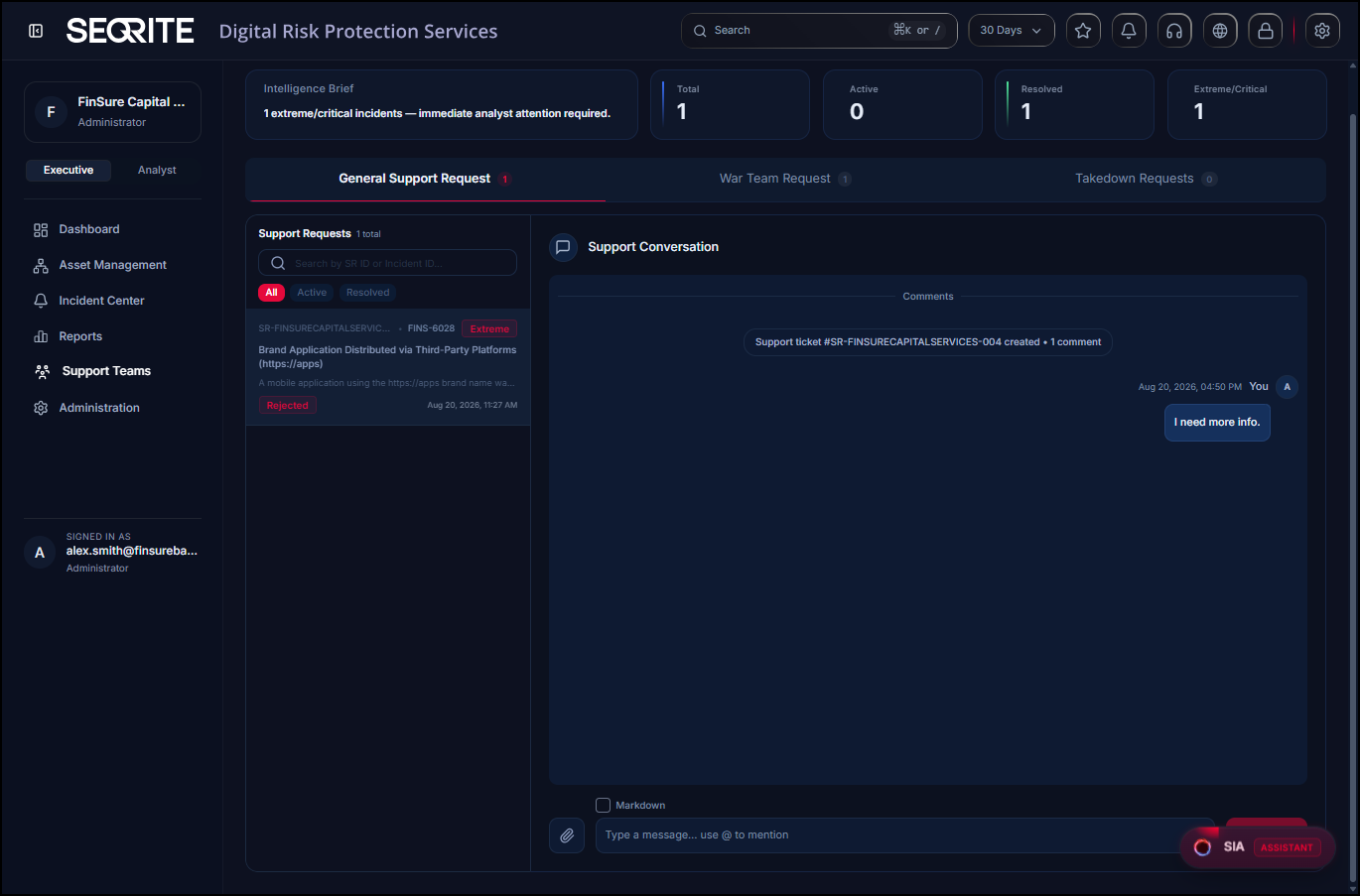
The Intelligence Brief tile highlights extreme and critical items that require immediate analyst attention. It provides a summary of the total, active, resolved, and extreme-critical items.
General Support Request
Technical assistance provided by the team to address customer queries and issues.
- Support Request
Support Requests show all, active, and resolved support requests, helping you track the status of your requests. - Support Conversation
It is the communication thread associated with the request. You can communicate with the support team regarding your request. It displays the complete conversation history, including updates, comments, and attachments, helping you track the progress of the request.
War Team
In the War Team, you can view all alerts assign for immediate action after an SOS is triggered, including critical communication and social media exposure, along with their status and available team response action.
You can filter the requests by war status, alert status, and date range.
Takedown Requests/Legal Team
In the Legal Team, you can view and manage all alerts sent for takedown and legal review via the Take Down action. Track their legal status, access supporting documents, and monitor progress towards resolution.