

The Logs page helps you track all user activities performed on the Seqrite Data Privacy console, including create, update, delete, export, approvals, Data Subject Requests (DSRs), workflow-related events.
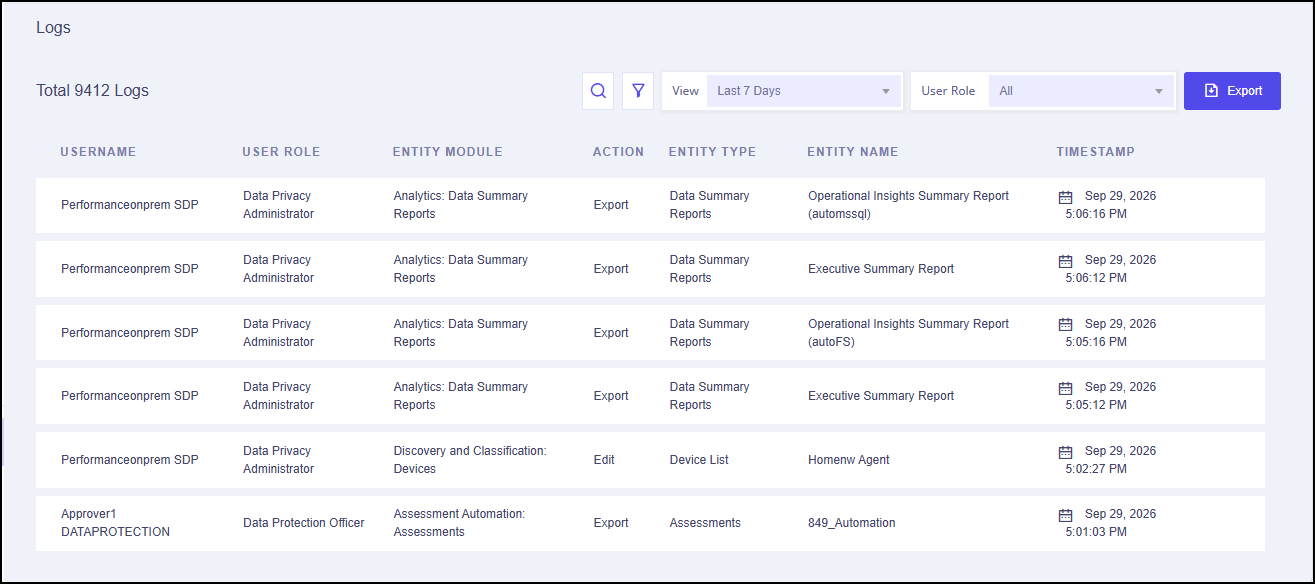
The following details are displayed on this page.
| Column Name | Description |
|---|---|
| User Name | Name of the user who performed the action. |
| User Role | Role of the user who performed the action. |
| Entity Module | The module and sub-module affected by the action. |
| Action | Type of the performed action. |
| Entity Type | The entity type that was affected. |
| Entity Name | The entity name that was affected. |
| Timestamp | The date and time on which the action was performed. |
The following options are available in the upper right corner.
| Field | Description |
|---|---|
| Filter | Filter logs based on user name, entity module, and actions |
| View | View logs for a particular duration from the drop-down menu. |
| User Role | View logs as per user role from the drop-down menu. |
| Export | Export the event logs to your local computer in the .csv format. |